
Why Beneficiaries Choose CareSource
{{ cur.quote }}
Opens enrolltricare.com in a new tab. Click Sign In in the top-right corner to begin. You’ll need your DS Logon, ID.me or CAC login.
Life in Motion
Life for military-connected families is always moving, but their health care doesn’t have to be a source of stress. CareSource Military & Veterans™ (CSMV) offers a TRICARE Prime® Demo option that provides stability, clarity, and compassionate support.
The Life in Motion campaign film and four 30-second spots. Partners can download every cut in the Partner Toolkit.
{{ lcur.spot }} · {{ lcur.len }}
Campaign Spots ({{ lspotCount }})
Watch and Learn: Your TRICARE Prime® Options in Atlanta and Tampa
Have Questions About Your Options?
Talk with our team about providers, benefits and next steps.
Opens enrolltricare.com in a new tab. Click Sign In in the top-right corner to begin. You’ll need your DS Logon, ID.me or CAC login.
Ready to Enroll? Here’s Exactly How.
Enrollment is completed through TRICARE, not on this site. Pick the way that works for you.
Talk to an Enrollment Specialist
Mon–Fri, 8 a.m.–6 p.m. ET. They can complete your enrollment with you on the call.
877-996-9333Form DD 2876-1
Fax to 703-672-1003, or mail to TRICARE Enrollment, c/o MicroHealth, 8229 Boone Blvd., Suite 500, Vienna, VA 22182.
Download the form (PDF)How to Enroll Online
Enrollment happens on enrolltricare.com, a separate TRICARE-approved website run by the TRICARE Prime® Demo enrollment contractor. You’ll leave this site to enroll. Four steps. Have your login ready.
- 1Go to enrolltricare.comUse the Enroll button above.
- 2To enroll, click the green “Sign In” (top right)The green button in the site header, shown at right.
- 3Log in with DS Logon, ID.me or CACSame credentials you use for milConnect.
- 4Choose TRICARE Prime Demo and your PCMHave your preferred primary care manager’s name handy.
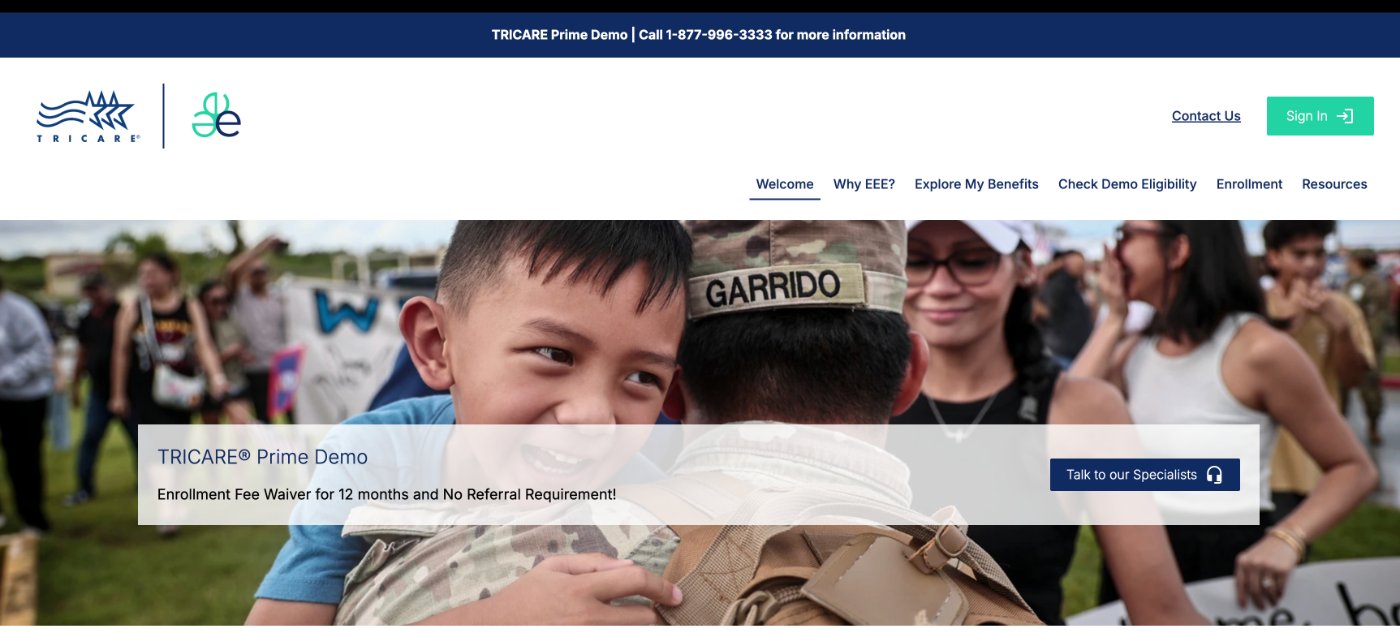
Already on TRICARE Prime? You may not see the demo in Beneficiary Web Enrollment (milConnect). Use enrolltricare.com or enroll by phone instead.